2010 Cadillac CTS Keyless Entry Remote Fob Smart Key Programming Instructions
Programming Instructions for 2010 Cadillac CTS Remote Fob
With “Smart Entry System” and one programmed Transmitter Available
-
NOTE: A maximum of 4 transmitters can be programmed.
- Obtain all remote transmitters.
-
NOTE: Switch ignition OFF.
- Place programmed transmitter within the interior of the vehicle.
- Insert key into driver’s door lock (use trunk lock for 2-door vehicles).
- Within 5 seconds turn key to unlock 5 times. Driver’s information center will display READY for FOB2.
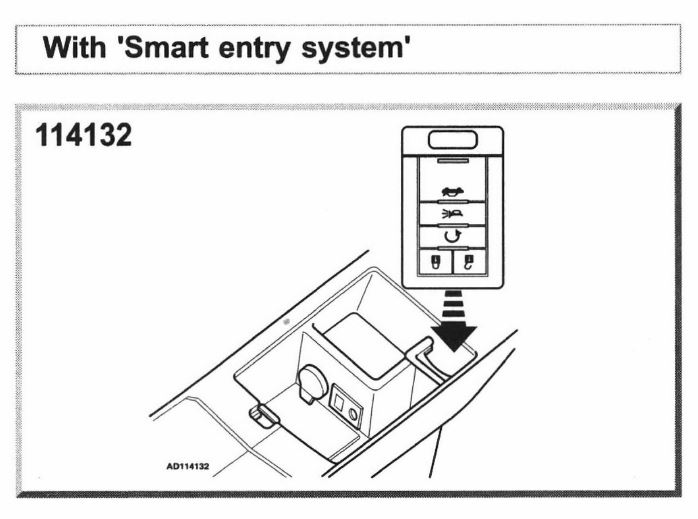
- Place the new, unrecognized transmitter into the center console transmitter pocket with transmitter buttons facing the front of the vehicle.
- Ensure acoustic signal is emitted. Driver’s information center will display READY FOR FOB 3
- Remove programmed transmitter from the transmitter pocket.
- Repeat steps 1, 2 and 3 for each of the remaining transmitters.
- Press OFF/ACC button (ignition switch) to complete and exit programming mode.
- Test each of the remotes to make sure it’s working.
With “Smart Entry System” and No Programmed Transmitters
This procedure takes about 30-35 mins to program a key. Also, the insert blade needs to be cut prior to performing this programming procedure.
- Obtain all remote transmitters
-
NOTE: Switch ignition OFF
- Place the new unrecognized transmitter into the transmitter pocket with transmitter buttons facing the front of the vehicle
- Insert key into driver’s door lock
- Within 5 seconds turn key to unlock position 5 times. Driver’s information center will display OFF/ACC TO LEARN
- Press the OFF/ACC button (ignition switch)
-
-
- Driver’s information center will display WAIT 10 MINUTES and will count down to zero in 1-minute intervals.
- After 10 minutes. The driver’s information center will display OFF/ACC TO LEARN
- Press the OFF/ACC button (ignition switch)
-
-
- Driver’s information center will display WAIT 10 MINUTES and will count down to zero in 1-minute intervals.
- After 10 minutes. The driver’s information center will display OFF/ACC TO LEARN
- Press the OFF/ACC button (ignition switch)
-
-
- Driver’s information center will display WAIT 10 MINUTES and will count down to zero in 1-minute intervals
- After 10 minutes: Acoustic signal is emitted, and driver’s information center will display READY FOR FOB 1
- Another acoustic signal is emitted indicating programming complete and the driver’s information center displays READY FOR FOB 2
- Remove first transmitter FOB1
- Carry out above procedure for the three remaining transmitters
- When all four transmitters have been programmed driver’s information center displays MAX FOBS LEARNED and will exit programming mode
- Operate each transmitter to finalize programming and check operation
-
NOTE: Remote transmitters can also be programmed using diagnostic equipment by an automotive locksmith or a dealer.

Key Programming Information for 2010 Cadillac CTS
With “Smart Entry System” and one programmed Transmitter Available
- NOTE: A maximum of 4 transmitters can be programmed.
- Obtain all remote transmitters.
- NOTE: Switch ignition OFF.
- Place programmed transmitter within the interior of the vehicle.
- Insert key into driver’s door lock (use trunk lock for 2-door vehicles).
- Within 5 seconds turn key to unlock 5 times. Driver’s information center will display READY for FOB2.
- Place the new, unrecognized transmitter into the center console transmitter pocket with transmitter buttons facing the front of the vehicle.
- Ensure acoustic signal is emitted. Driver’s information center will display READY FOR FOB 3
- Remove programmed transmitter from the transmitter pocket.
- Repeat steps 1, 2 and 3 for each of the remaining transmitters.
- Press OFF/ACC button (ignition switch) to complete and exit programming mode.
- Test each of the remotes to make sure it’s working.
With “Smart Entry System” and No Programmed Transmitters
This procedure takes about 30-35 mins to program a key. Also, the insert blade needs to be cut prior to performing this programming procedure.
- Obtain all remote transmitters
- NOTE: Switch ignition OFF
- Place the new unrecognized transmitter into the transmitter pocket with transmitter buttons facing the front of the vehicle
- Insert key into driver’s door lock
- Within 5 seconds turn key to unlock position 5 times. Driver’s information center will display OFF/ACC TO LEARN
- Press the OFF/ACC button (ignition switch)
-
-
- Driver’s information center will display WAIT 10 MINUTES and will count down to zero in 1-minute intervals.
- After 10 minutes. The driver’s information center will display OFF/ACC TO LEARN
- Press the OFF/ACC button (ignition switch)
-
-
- Driver’s information center will display WAIT 10 MINUTES and will count down to zero in 1-minute intervals.
- After 10 minutes. The driver’s information center will display OFF/ACC TO LEARN
- Press the OFF/ACC button (ignition switch)
-
-
- Driver’s information center will display WAIT 10 MINUTES and will count down to zero in 1-minute intervals
- After 10 minutes: Acoustic signal is emitted, and driver’s information center will display READY FOR FOB 1
- Another acoustic signal is emitted indicating programming complete and the driver’s information center displays READY FOR FOB 2
- Remove first transmitter FOB1
- Carry out above procedure for the three remaining transmitters
- When all four transmitters have been programmed driver’s information center displays MAX FOBS LEARNED and will exit programming mode
- Operate each transmitter to finalize programming and check operation
- NOTE: Remote transmitters can also be programmed using diagnostic equipment by an automotive locksmith or a dealer.
Use our
Locksmith Search if you need professional help.
Use our
Program Instruction Search for programming instructions.
<div class="dynamic-checkout__content" id="dynamic-checkout-cart" data-shopify="dynamic-checkout-cart"> <shopify-accelerated-checkout-cart wallet-configs="[{"supports_subs":true,"supports_def_opts":false,"name":"shop_pay","wallet_params":{"shopId":57803767910,"merchantName":"Keyless2Go","personalized":true}}]" access-token="7001448ca3fb1ff1858a7a9be9f10077" buyer-country="US" buyer-locale="en" buyer-currency="USD" shop-id="57803767910" cart-id="51d1e165dc4795c43ba0c26cf7a4f91b" enabled-flags="["a1d1f9a1"]" > <div class="wallet-button-wrapper"> <ul class='wallet-cart-grid wallet-cart-grid--skeleton' role="list" data-shopify-buttoncontainer="true"> <li data-testid='grid-cell' class='wallet-cart-button-container'><div class='wallet-cart-button wallet-cart-button__skeleton' role='button' disabled aria-hidden='true'> </div></li> </ul> </div> </shopify-accelerated-checkout-cart> </div>